
GrantForge ships with an authorization server built on Spring Authorization Server that follows the security requirements of OAuth 2.1: it supports only the authorization code flow (PKCE required), refresh tokens, and client credentials; the implicit flow and the password grant are not supported.
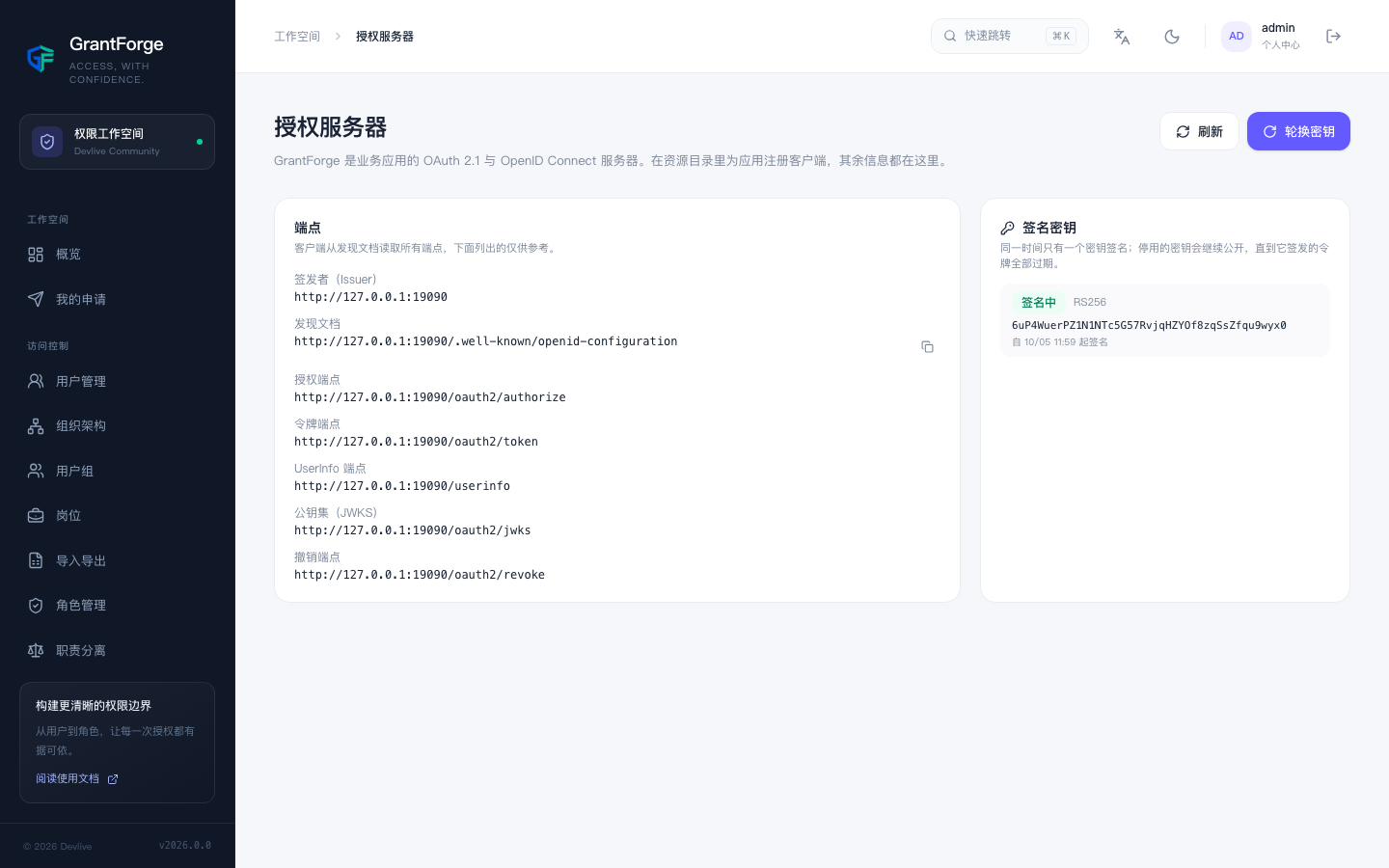
Discovery document and endpoints
Discovery document: <GrantForge>/.well-known/openid-configuration; you can copy it directly from the Platform management → Authorization server page. The issuer defaults to the address the request arrives at; when deploying behind a reverse proxy, pin it with grantforge.oauth.issuer.
| Endpoint | Description |
|---|---|
/oauth2/authorize |
Authorization code flow; all clients must use PKCE (S256) |
/oauth2/token |
Authorization code, refresh token, client credentials. Refresh tokens are rotated on every use; an old token showing up again revokes the entire grant |
/oauth2/revoke |
Token revocation |
/oauth2/jwks |
Signing public keys (RS256) |
/userinfo |
sub, tid, preferred_username; the profile scope adds name, the email scope adds email |
Access tokens and ID tokens contain tid (the tenant ID) and preferred_username; the ID token's auth_time is when the user signed in to the console.
Clients
Select the application under Platform management → Resource catalog and click "OAuth clients" to manage its clients.
| Setting | Rules |
|---|---|
| Type | A public client is for browser, mobile, and other applications that cannot keep a secret; a confidential client is for server-side applications and has a secret |
| Redirect URIs | Up to 10, absolute URIs; wildcards and fragments are not allowed. Must be https, or local http (localhost, 127.0.0.1, [::1]), or a native app's custom scheme |
| scope | openid, profile, email, permissions (query permissions), catalog (declare data entities, client credentials only) |
| Grant types | Authorization code, refresh token (requires the authorization code grant; only confidential clients receive it), client credentials (confidential clients only) |
| Token lifetimes | Access tokens 1 minute–24 hours (default 15 minutes); refresh tokens 1 hour–90 days (default 30 days) |
A confidential client's secret is shown only once, at registration or rotation, and GrantForge stores only its hash. Rotation can set a grace period (up to 7 days) during which both the old and the new secret are valid, making rolling updates easy.
Token rules
- Tokens are stored hashed: even a database leak yields no usable tokens.
- After any of the following, issued tokens are no longer renewed: the client is disabled or deleted, the account is disabled or locked, the account must change its password, or the tenant is disabled.
- Browser cross-origin calls: GrantForge allows origins that host an enabled client's redirect URIs to call the token endpoints and the Open API cross-origin, without cookies.
Signing keys
Signing keys are generated with RSA 2048 and the private keys are stored encrypted. By default they rotate automatically every 90 days (grantforge.oauth.signing-key-rotation), and old public keys keep being published in the JWKS for 2 more days (signing-key-retention) so that tokens issued before a rotation still verify. When needed, you can rotate immediately from the authorization server page (a sensitive operation; accounts with two-step verification enabled must verify again).
Using GrantForge to sign in to systems other than the console
Any system that supports OpenID Connect (Grafana, GitLab, Jenkins, and so on) can use GrantForge as its IdP: create an application and a confidential client for it in the resource catalog, then fill the discovery document URL, the client_id, and the secret into that system's OIDC configuration. Conversely, GrantForge can also sign in with other IdPs; see Identity sources.